Growing fast7 projects shipped, nearly 3 more every month

CUSTOM SOFTWARE DEVELOPMENT

Custom software development for warehouses, wholesalers and growing businesses.

We build warehouse and inventory software, ordering apps and connected business software for wholesalers and distributors. See how our systems work, from a store placing an order to the warehouse getting it ready.

Get a free consultation today Call (321) 208-4522

Watch our film or see real work below. We agree on the design fee before building your app; websites are available free.

One easy product, built around your workflowHuman-reviewed releasesCan't solve it? You pay nothing
MELBOURNE WHOLESALE · ORDERING SYSTEM
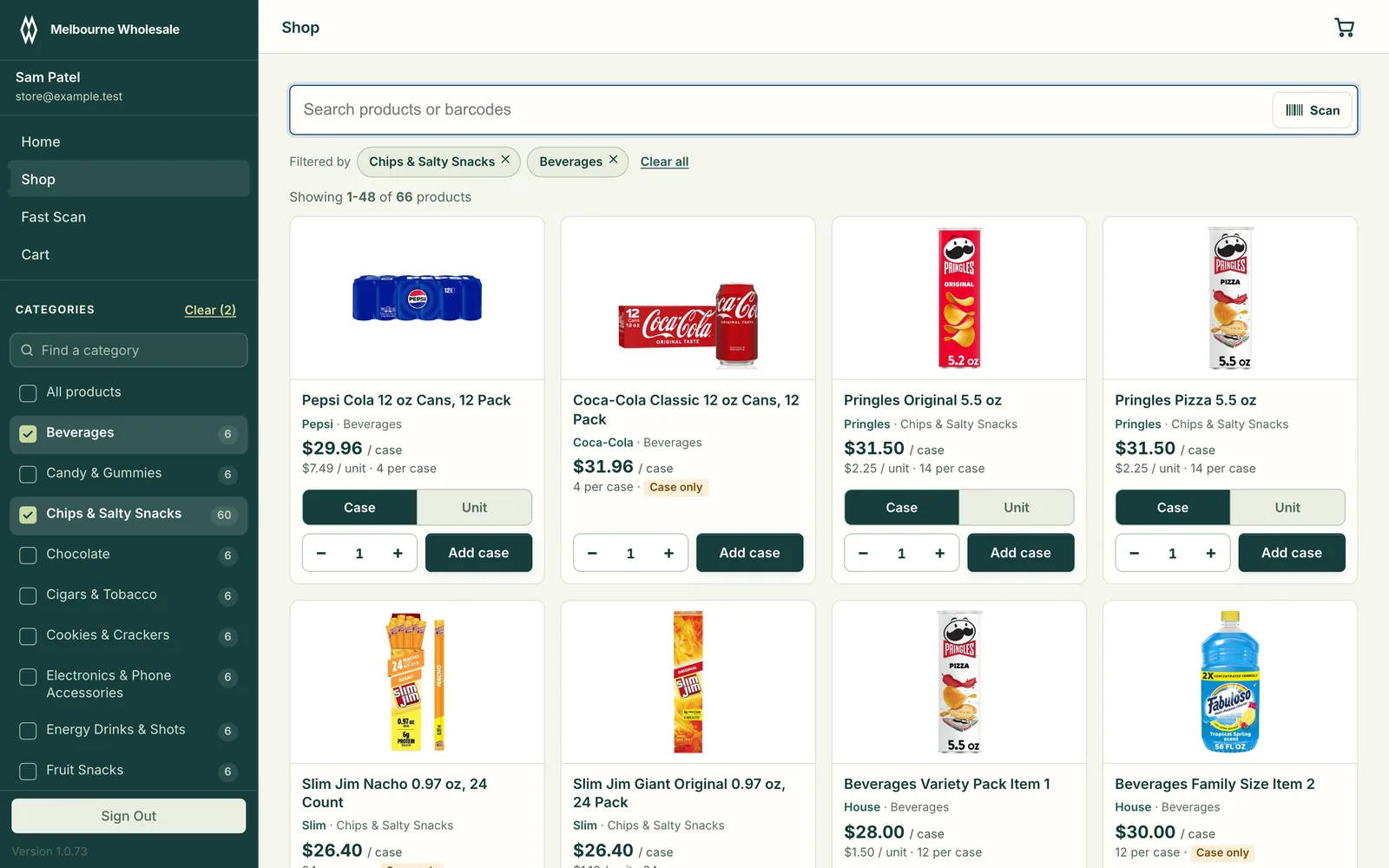
Real Melbourne Wholesale customer ordering interface with products, case prices and cart actions.
Customer ordering · Desktop
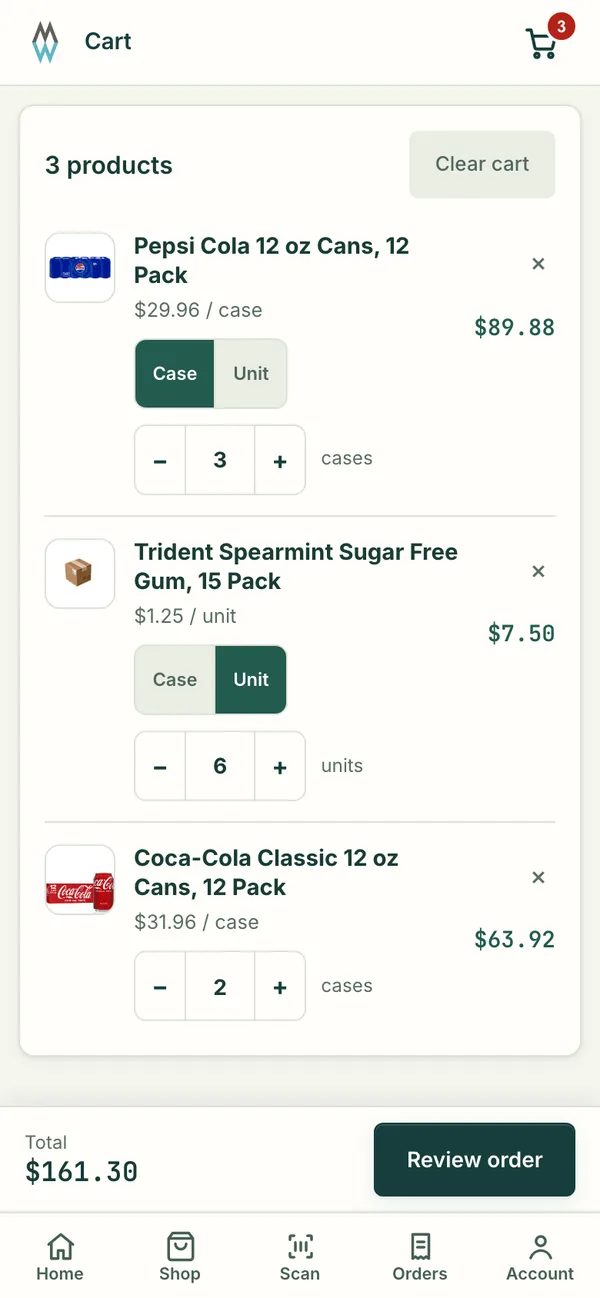
Real mobile ordering cart showing case and unit quantities.
Mobile ordering
Screens from the working system, shown with sample data
Businesses doing millions a year run on software we built
$1M+
Customers on a single system we built, and growing
100s
Texts a day through a platform we built
500K+
Lower cost per text for that client
73%
Of a warehouse owner's typing time saved
90%
Projects shipped, nearly 3 more every month
7
EARLY RESULTS

Real businesses. Real numbers. Real impact.

We work with businesses doing millions of dollars a year and serving hundreds of customers across New York, New Jersey and Florida, and every one of them runs a part of their business on software we built. And the numbers keep climbing every month.

Political texting · Midterm elections

500K+ texts sent every day

Half a million compliant texts a day, at 73% lower cost.

A texting platform where a person sends every single message by hand, as the rules for election texting require. It now carries more than 500,000 texts a day without breaking compliance, and the cost per text dropped from $0.03 to $0.008, a 73% saving.

Now building: their calling platform and an internal operating system that replaces their spreadsheets, covering the full life cycle of every campaign.
Wholesale distribution · Florida

100s of stores ordering from their phones

Melbourne Wholesale: a complete upgrade of how the business runs.

Store owners order from a phone or computer at their own prices, scan a shelf to reorder, and the warehouse packs from the same system. The office sees revenue, unpaid invoices and customers at risk on one screen. Work that used to take phone calls and retyping now just flows.

  • 1,400+ products
  • 114 orders a month
  • 3 apps: web, iOS, Android

Live on the web, the App Store and Google Play.

Warehouse operations

90% of the owner's typing time saved

A paperless warehouse, run from phones and tablets.

Inventory is tracked on phones and tablets right on the warehouse floor, and the paperwork is gone. The owner used to sit and type every product in. Now he only checks and approves them, which saves him about 90% of that time and cuts the cost of mistakes and lost stock.

See our warehouse management software →

Retail · Online pickup

2 to 3 new pickup customers a day

A website that stays in sync with the store's register.

Prices and stock on the website follow the point-of-sale system automatically, so what customers see online is what is on the shelf. Shoppers check prices online every day and place pickup orders, bringing in 2 to 3 new pickup customers daily, and growing.

Subscription billing · Customer portal

24/7 self-service payments and support

Every customer, every payment and every ticket in one place.

Each of their customers has their own login with role-based access. They pay online through Stripe on a subscription, update their card themselves, and raise tickets, issues and concerns in the same portal. The business sees every customer's dashboard and every payment without chasing anyone.

Inventory · Customer retention

100% moved off QuickBooks and old systems

Products, stock and the customers you are about to lose.

We moved everything over from QuickBooks and their older systems into one place. The owner sees products and stock online, manages inventory, and gets a report of customers who used to buy and have gone quiet, so he can win them back before they are gone.

AI that does the busywork.

We connect our customers' systems to leading AI models, including ChatGPT, Claude and Grok, through their official APIs. Take a photo of a supplier invoice, upload it, and every line is added to the system automatically, with suggested price changes ready to approve. We also build voice features on the same models, and there is more on the way.

Our promise: if we can't solve it, you pay nothing.

No long contracts. No excuses. No questions asked.

We solve your problem with one easy product that helps your business move faster. One system your customers and team actually use, instead of a pile of spreadsheets, group chats and tools that were built for someone else.

If we can't solve your problem, we walk away and you pay nothing. No invoice, no fine print, no questions asked. That is how we started with our first customers: we solved their problem first, and they paid once they saw the results.

Get a free consultation today Call (321) 208-4522

Vextora: The Predictability Engine

A look at connected software and more predictable business operations.

Watch the film · 4 min 52 sec

SELECTED WORK

A closer look at what we build.

Explore real interfaces, practical workflows and the systems behind the work. Some clients are described without being named.

Melbourne Wholesale: from store orders to warehouse fulfillment

Live at melbournewholesale.com, on the App Store and Google Play.

Melbourne Wholesale is a distributor in Palm Bay, Florida that supplies convenience stores, gas stations and other independent retailers. Their customers sign in, see their own case pricing and order from a computer or phone. A barcode scanning app lets a store owner reorder by scanning the shelf. The warehouse packs each order and the customer is told when it is confirmed and delivered.

The customer shop on a computer: a product grid with case and unit prices, category filters, a search box that also takes barcodes, and add to cart buttons.
The shop, as a store owner sees it on a computer.
The cart on a phone with three products, a case or unit switch on each line and the order total.
The cart on a phone.
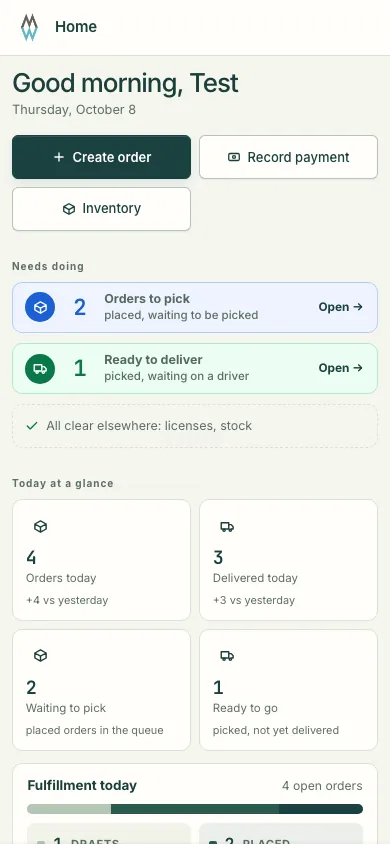
The warehouse home screen on a phone: orders to pick, orders ready to deliver and today's counts.
What the warehouse sees first.
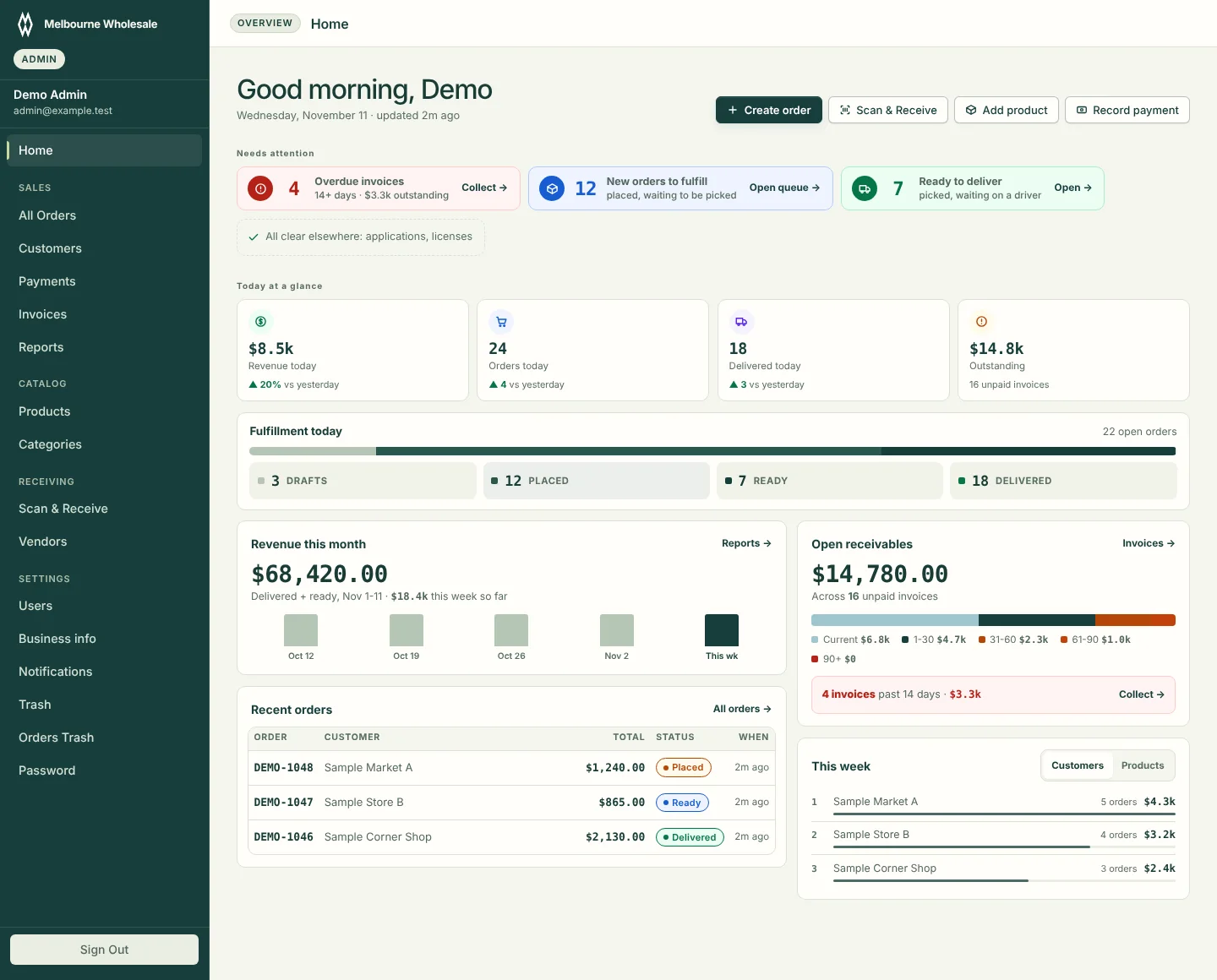
The office dashboard: overdue invoices, new orders to fulfill, revenue this month as a weekly bar chart, open receivables by age, recent orders and top customers this week.
The office dashboard: what needs attention, revenue by week and unpaid invoices by age.
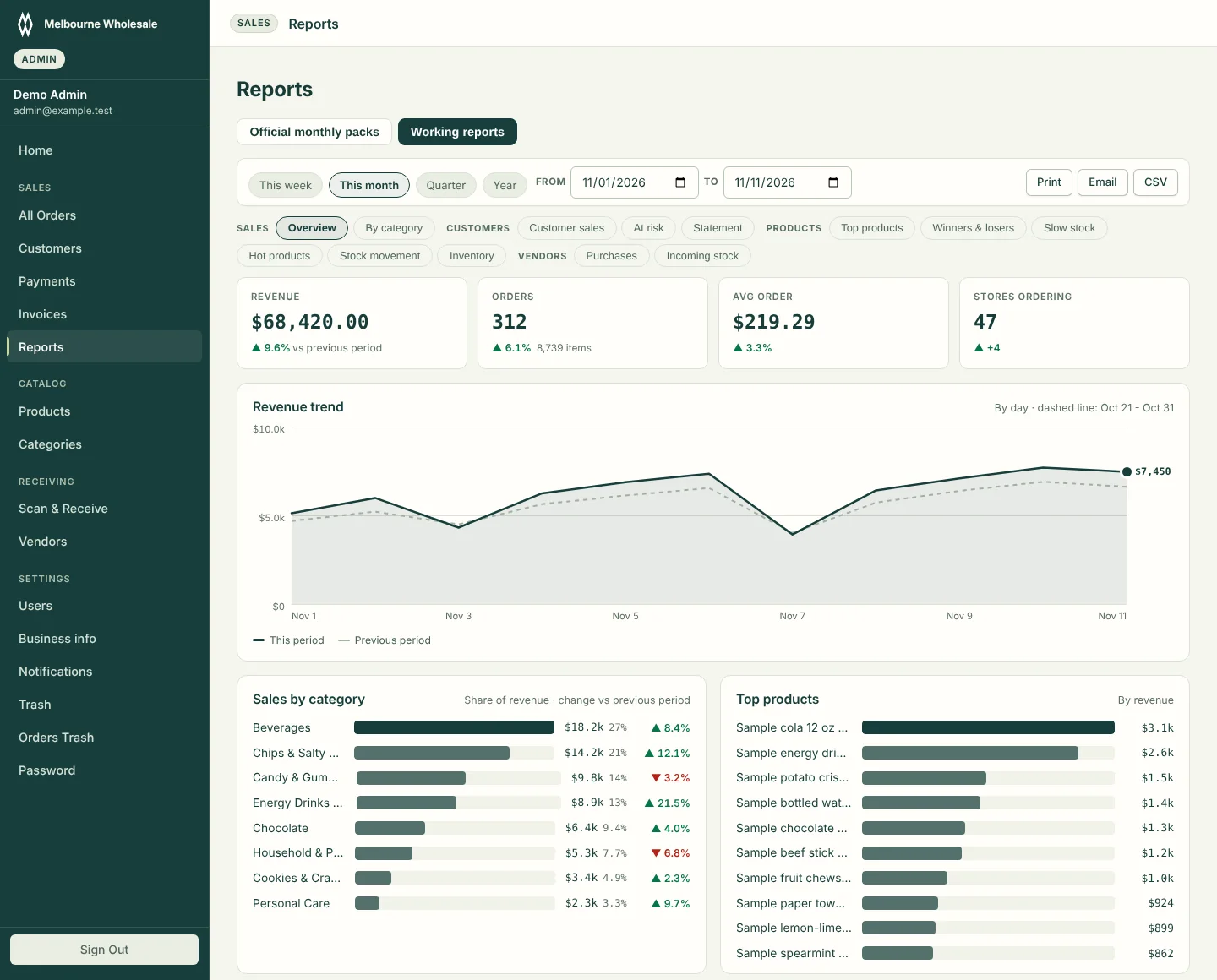
The sales overview report: revenue, orders, average order and stores ordering for the month, a revenue trend line against the previous period, and bar charts of sales by category and top products.
Sales overview: this month against the previous period.
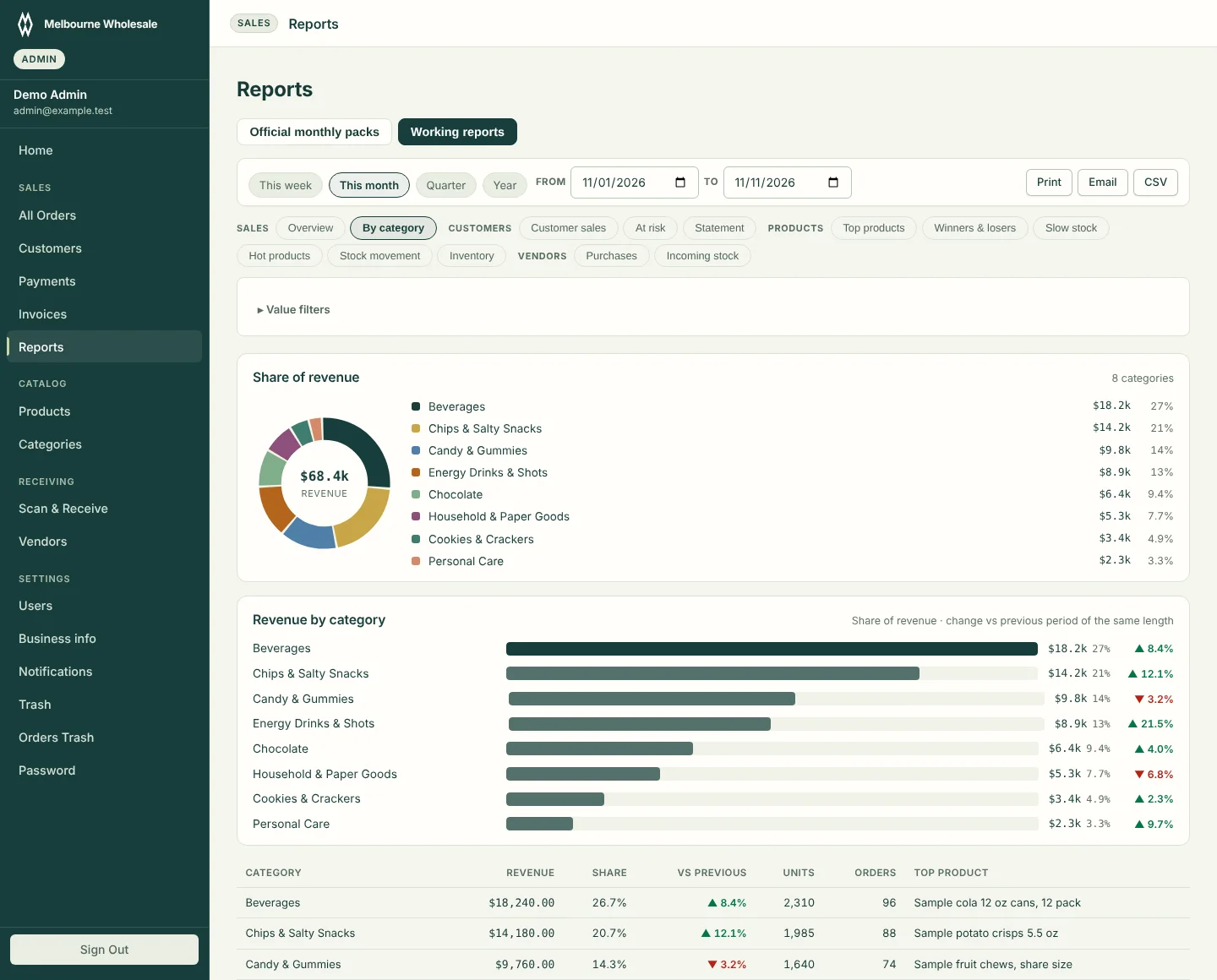
The sales by category report: a donut chart of each category's share of revenue and a bar chart with the change against the previous period.
Sales by category: share of revenue and what changed.

Other reports cover customers at risk, winners and losers, slow stock, stock movement, inventory and vendor purchases. Each one prints, emails or exports to CSV.

Real screens from the system, shown with test accounts and sample figures.

Stores ordering
Hundreds of store accounts, each with their own prices
Catalog
More than 1,400 products, priced by the case or by the unit
Who uses it
Store owners, warehouse staff and the office, each with their own login and screens
Order steps
Draft, placed, ready, delivered

Sqwat, a gym workout tracker

Live at sqwatapp.com

Our own app, made and run by Vextora Labs. Log sets and weights in a couple of taps, build your routines, and track personal records and body weight over time.

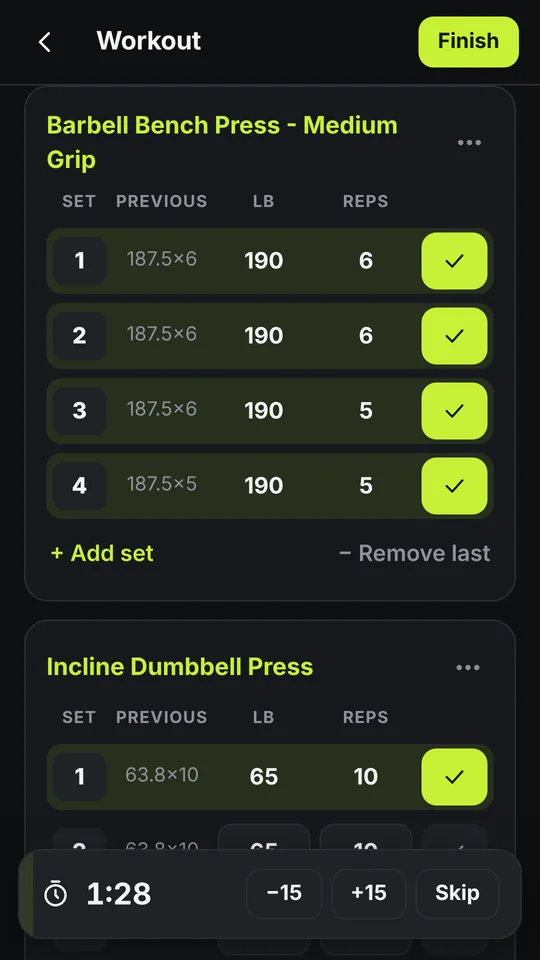
Logging a bench press workout in Sqwat: each set shows the previous weight and reps, with a rest timer at the bottom.
Logging a workout.
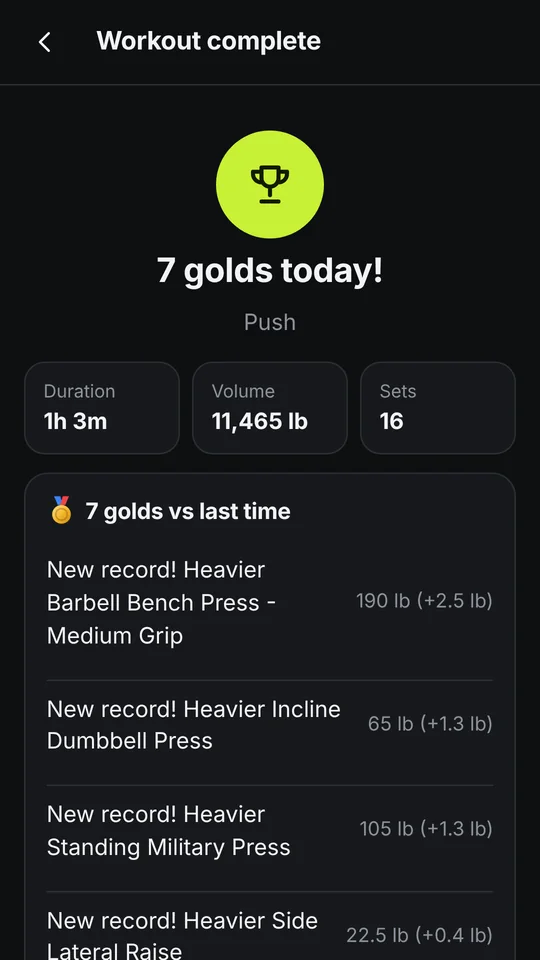
The workout complete screen: duration, total volume, sets and a list of new personal records.
When the workout is done.
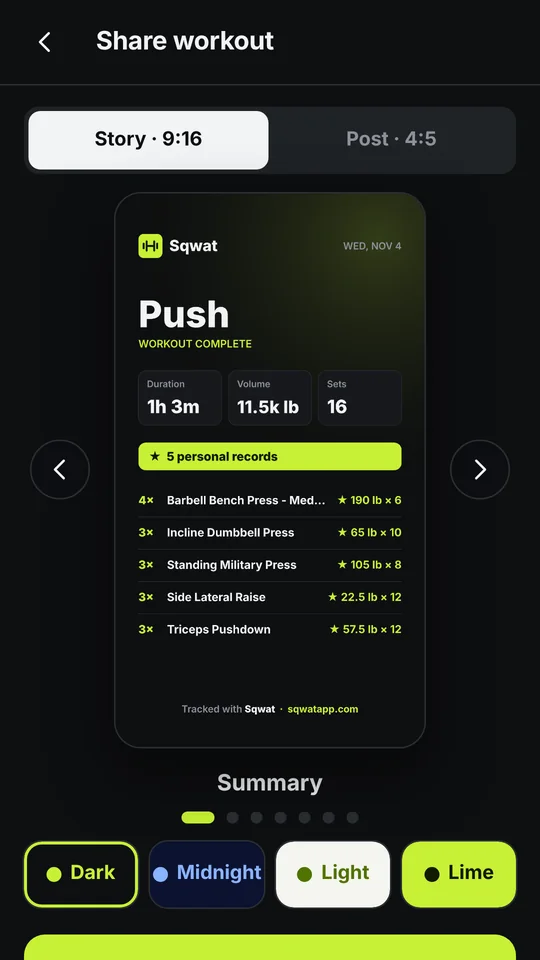
The share screen: a workout card sized for a story or a post, with four color themes.
A card to share on social media.
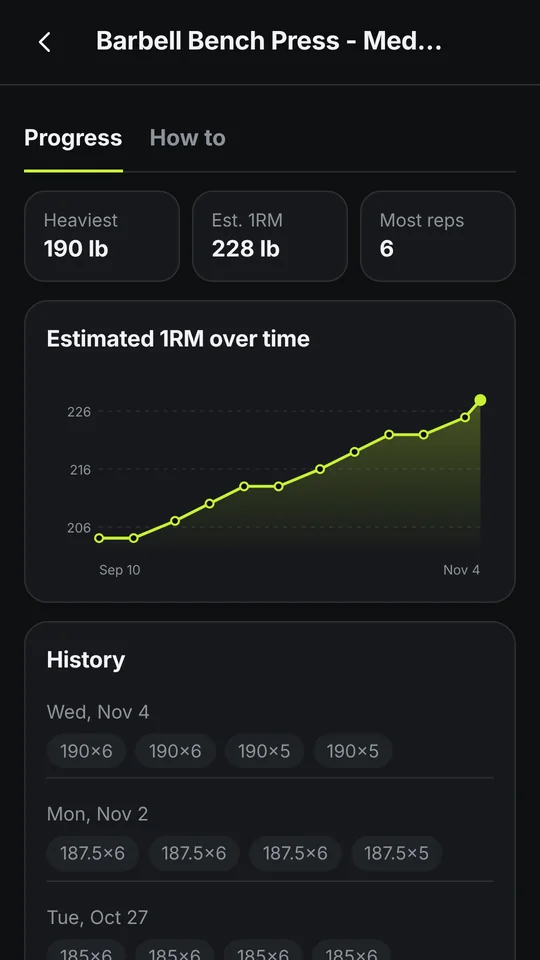
Progress for one exercise: heaviest lift, estimated one rep max over time as a line chart, and history.
Progress on one lift.
Price
Free, with no ads and no subscription
In the gym
Works offline, so a bad signal does not stop a workout

Survey platform for market research teams

Program a questionnaire with more than 20 question types, skip logic and quotas. Field it with a unique tracked link per respondent and watch quality as answers come in. Reports come out as toplines, crosstabs and clean data files.

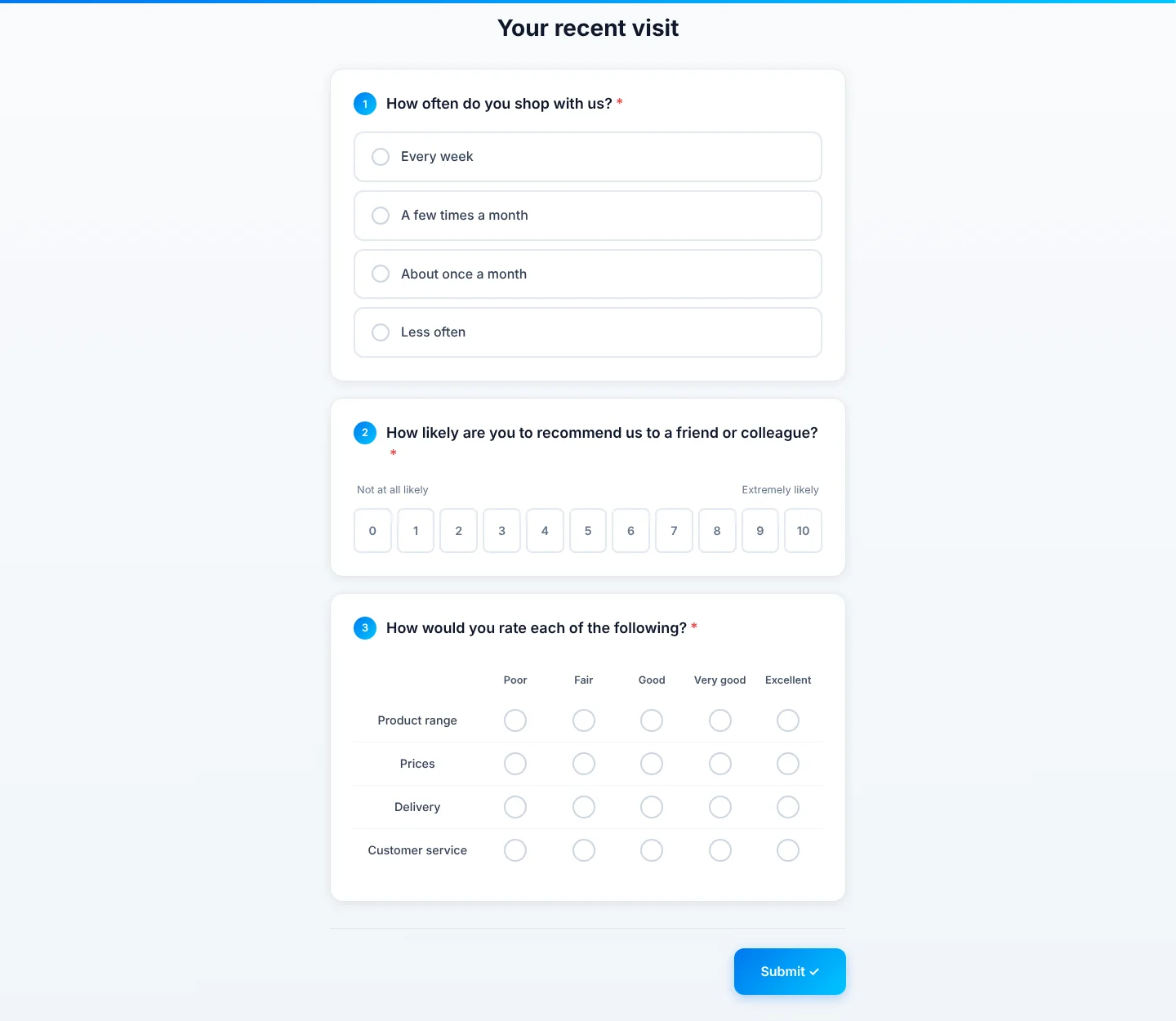
A survey as a respondent sees it: a single choice question, a zero to ten recommendation scale and a rating grid, with a progress bar at the top.
What a respondent sees. It works the same on a phone.
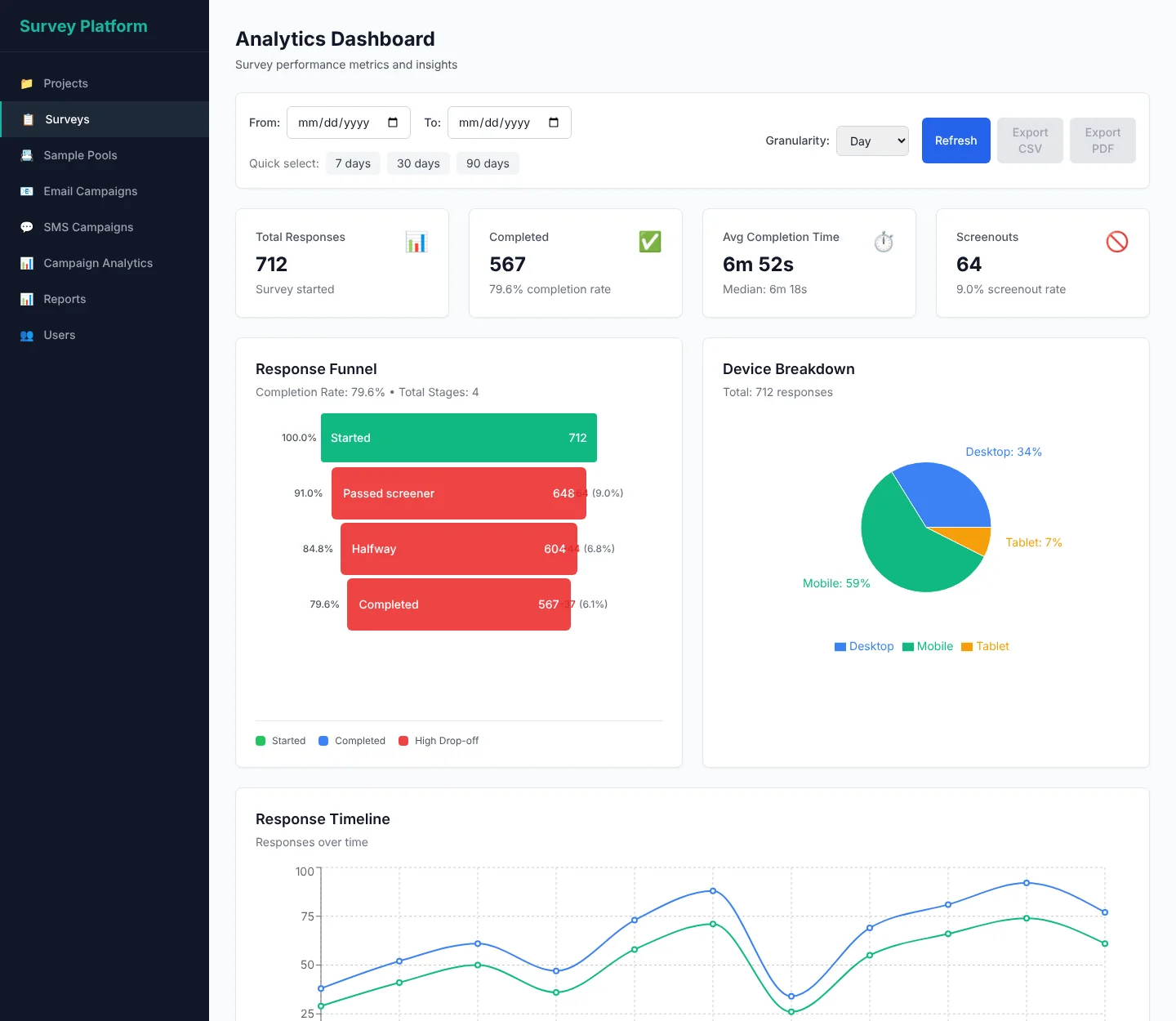
The analytics dashboard: total responses, completion rate, average completion time and screenouts, a response funnel, a device breakdown pie chart and a response timeline.
What the research team sees while the survey is in the field.

Real screens from the platform, shown with a sample survey and sample figures.

Call center dialer for phone surveys

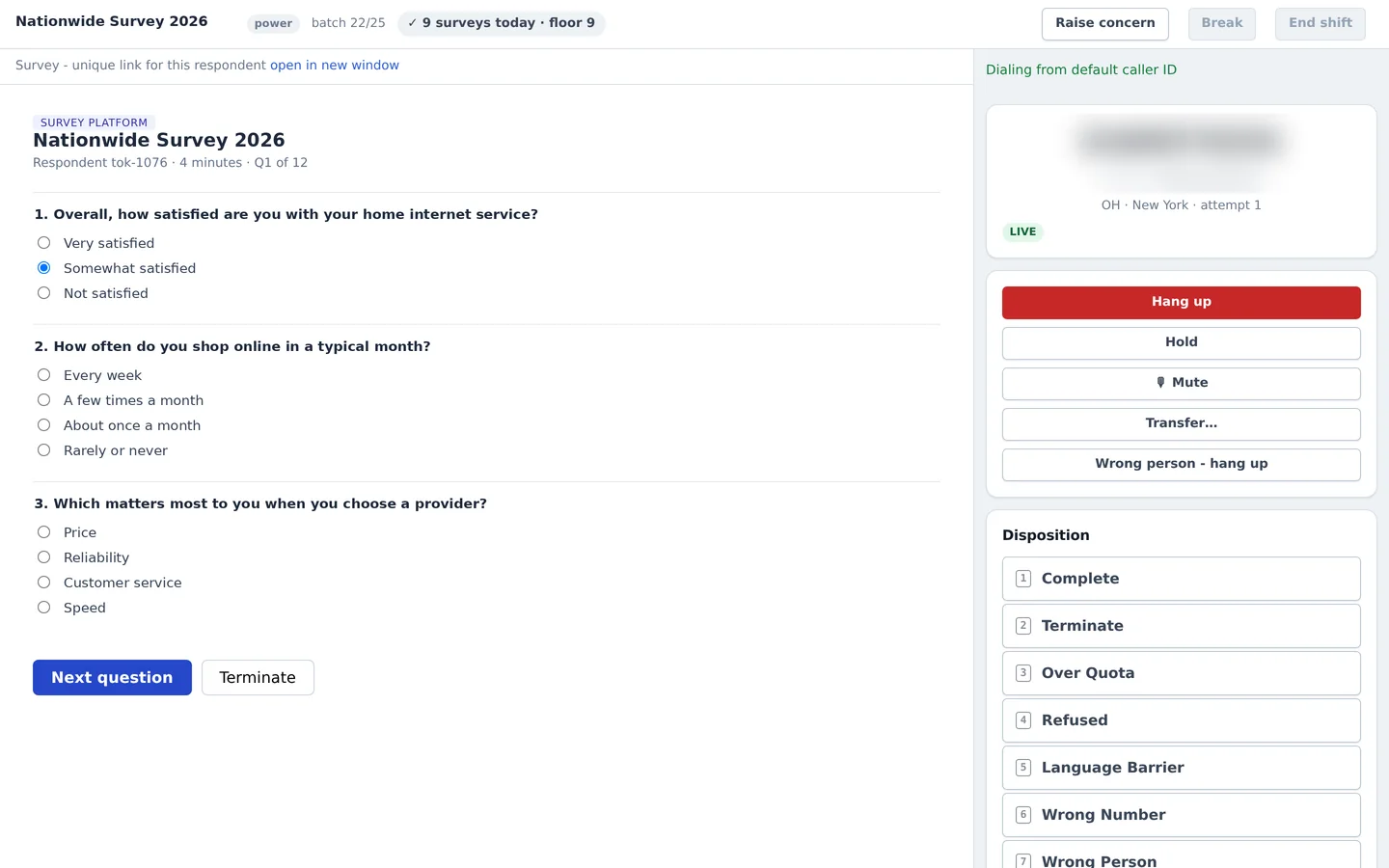
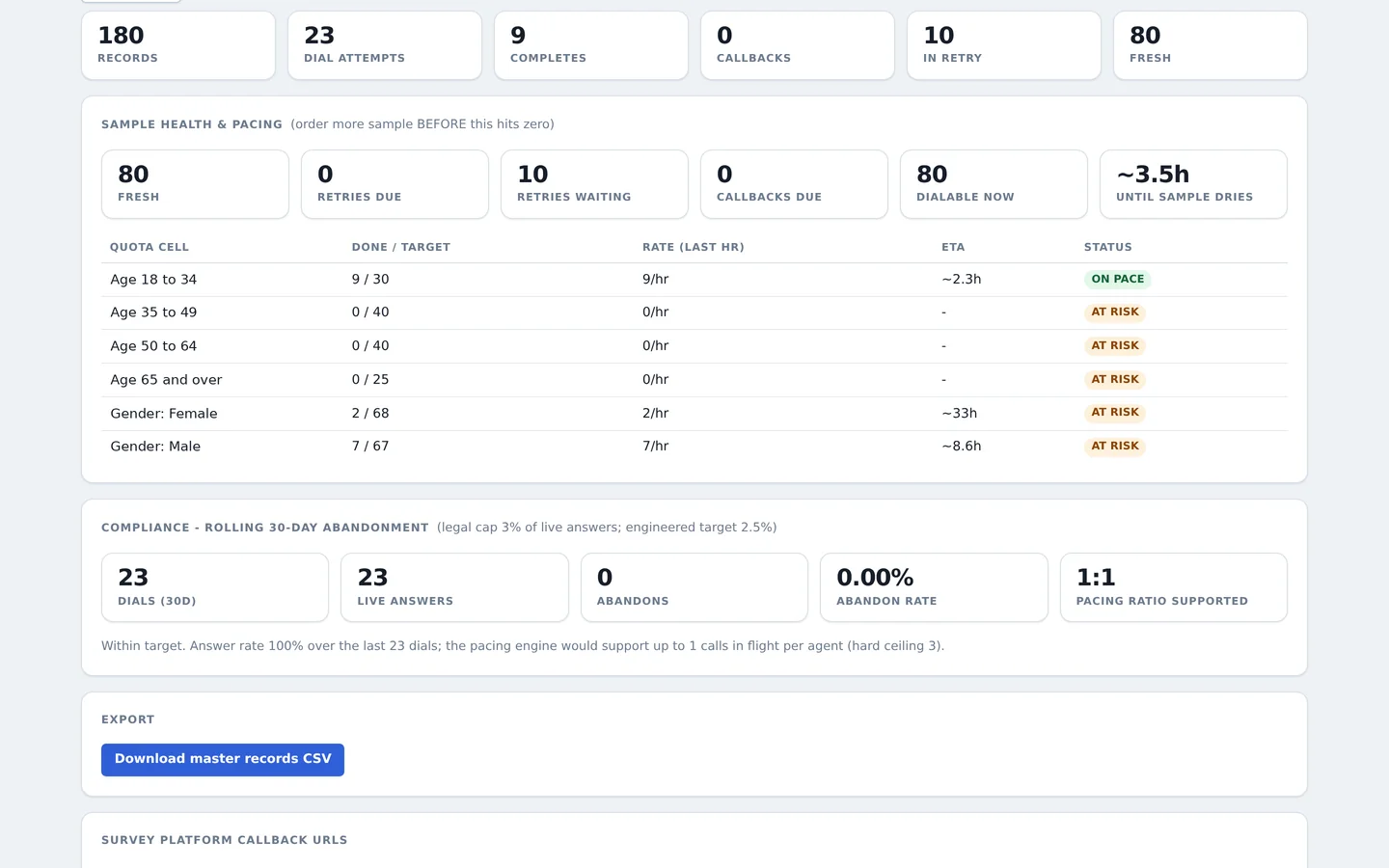
The agent sees the survey beside the call and records the outcome with one key. A supervisor puts a study on the dialer, watches the floor and hands off at the end of a shift. Reports show how fast each quota is filling and keep the abandoned-call rate under the legal limit.

The agent screen during a live call: the survey questions on the left, call controls and a numbered list of outcomes on the right. The phone number is blurred.
What an agent sees on a live call. The number is blurred.
A study report: records, dial attempts and completes, how much sample is left, age and gender quotas with pace and status, and the thirty day abandoned-call rate.
The study report: sample left, quota pace and compliance.

Real screens from the system, shown with a made-up study and sample figures.

  • Texting platform with a person behind every message

    For organizations that have to send texts one at a time. A project manager sets up the send, and supervisors release each message by hand at the scheduled time. Replies land in a shared inbox, opt-outs are recorded, and usage is reported for billing.

    Today it sends more than 500,000 texts a day for midterm election campaigns, at $0.008 per text instead of $0.03, a 73% saving.

  • Online store for a lifestyle brand

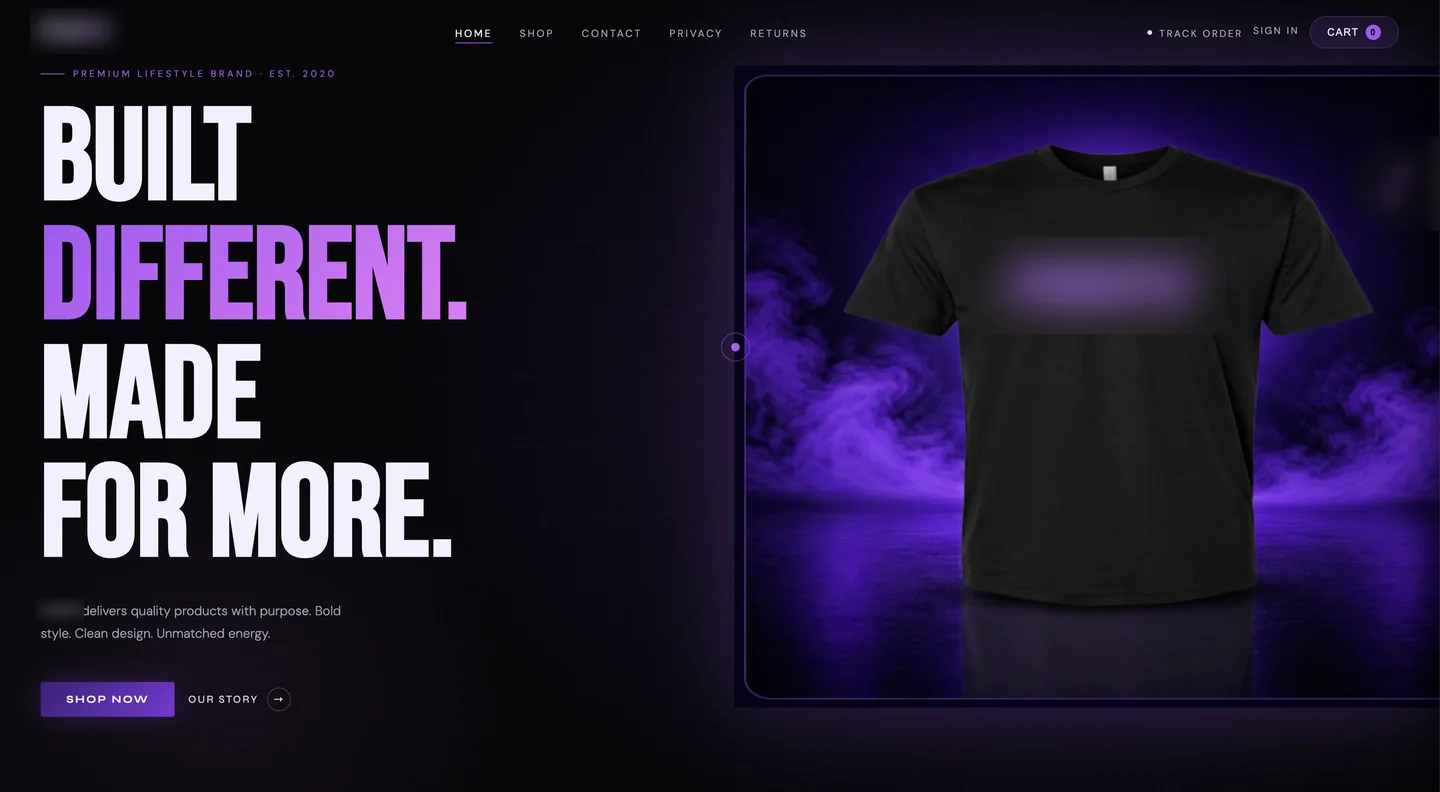
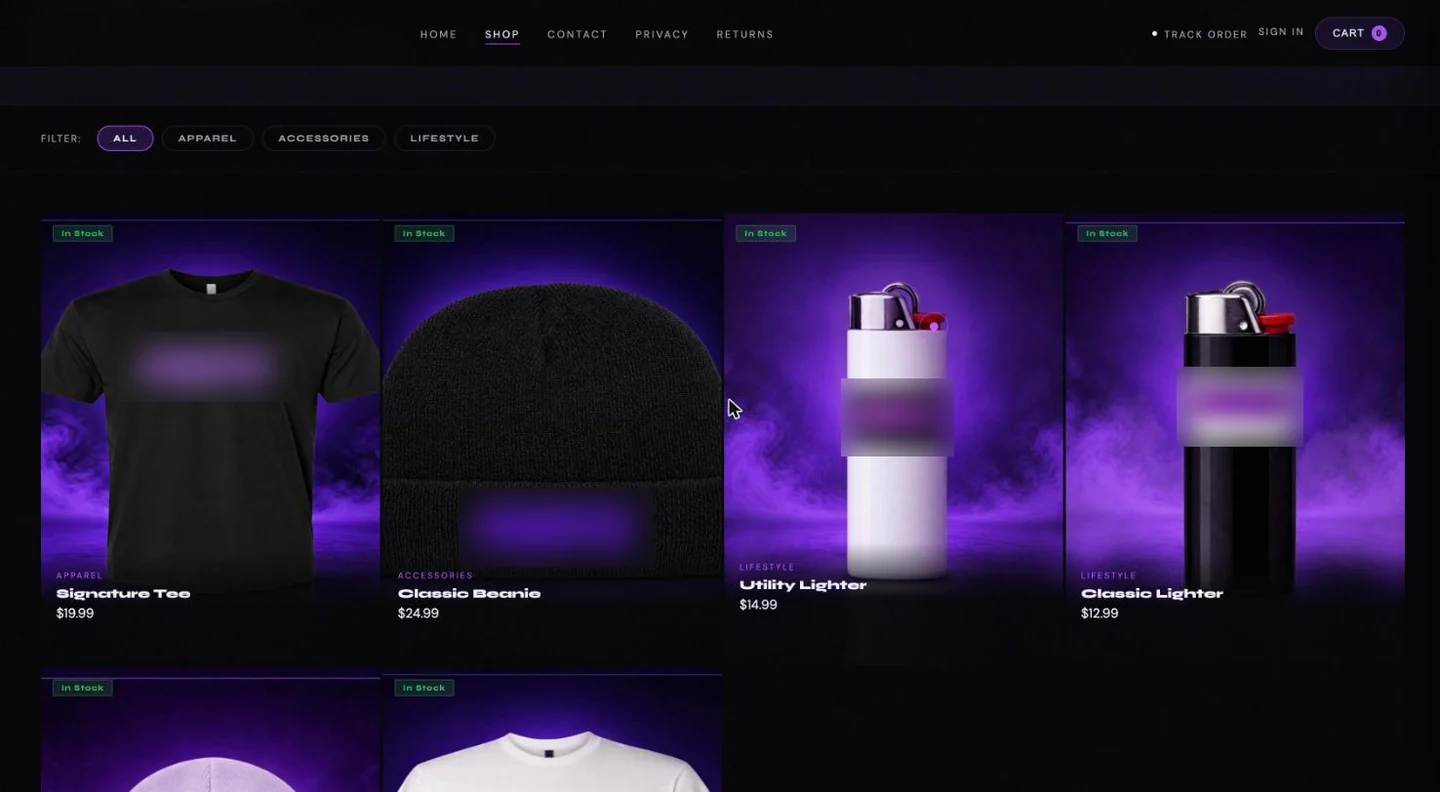
    The shop side has a catalog with filters, guest checkout with totals worked out on the server, customer accounts and order tracking. The owner's side shows what needs attention today, every order with its payment status, and products, prices and stock.

    The home page of an online store: a large headline, shop and story buttons, and a product photo. The brand name is blurred.
    The home page.
    The shop page: category filters and product cards for a tee, a beanie and two lighters with prices. Brand marks are blurred.
    The shop, with the real product photos.
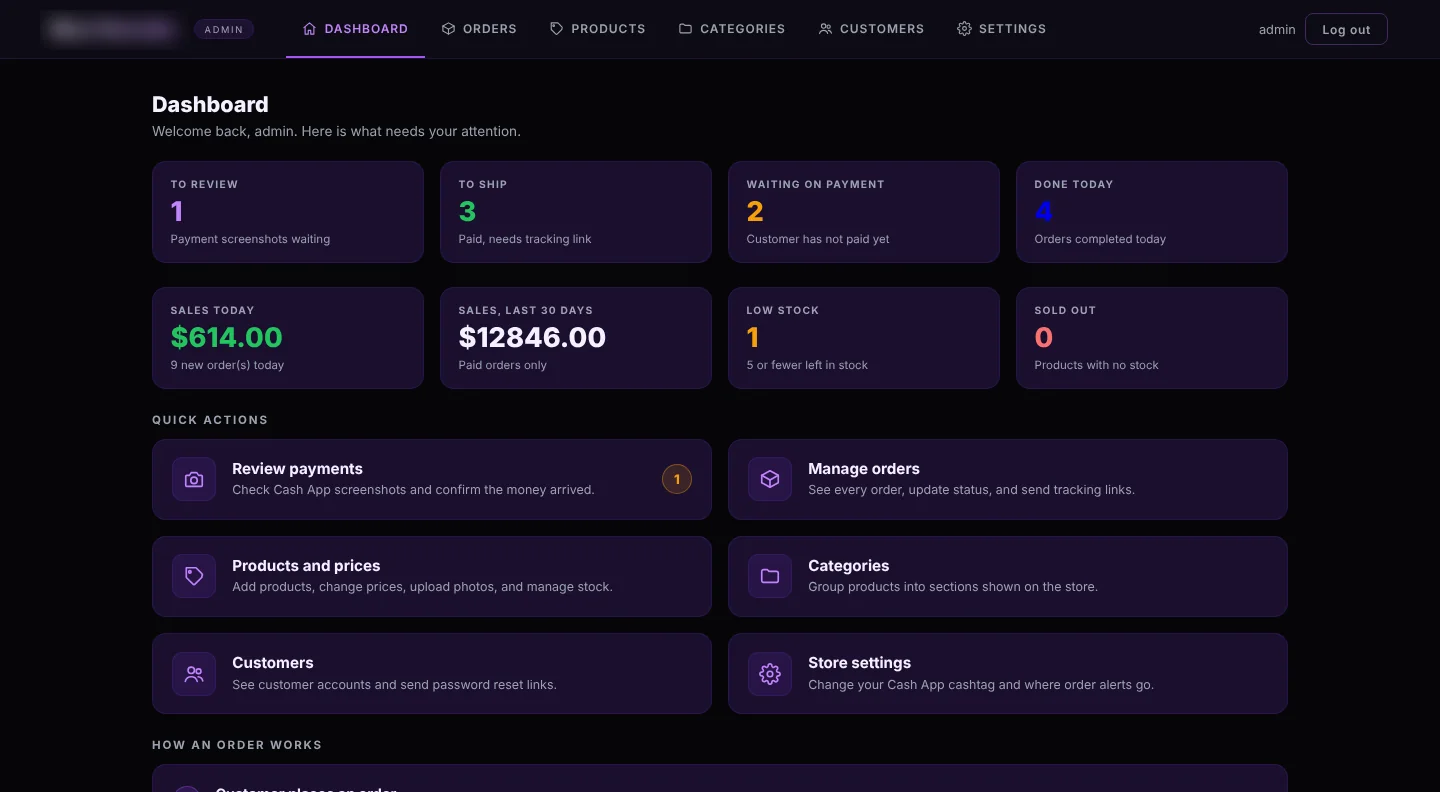
    The store owner's dashboard: orders to review and ship, sales today and over thirty days, low stock, and quick actions.
    The owner's dashboard.
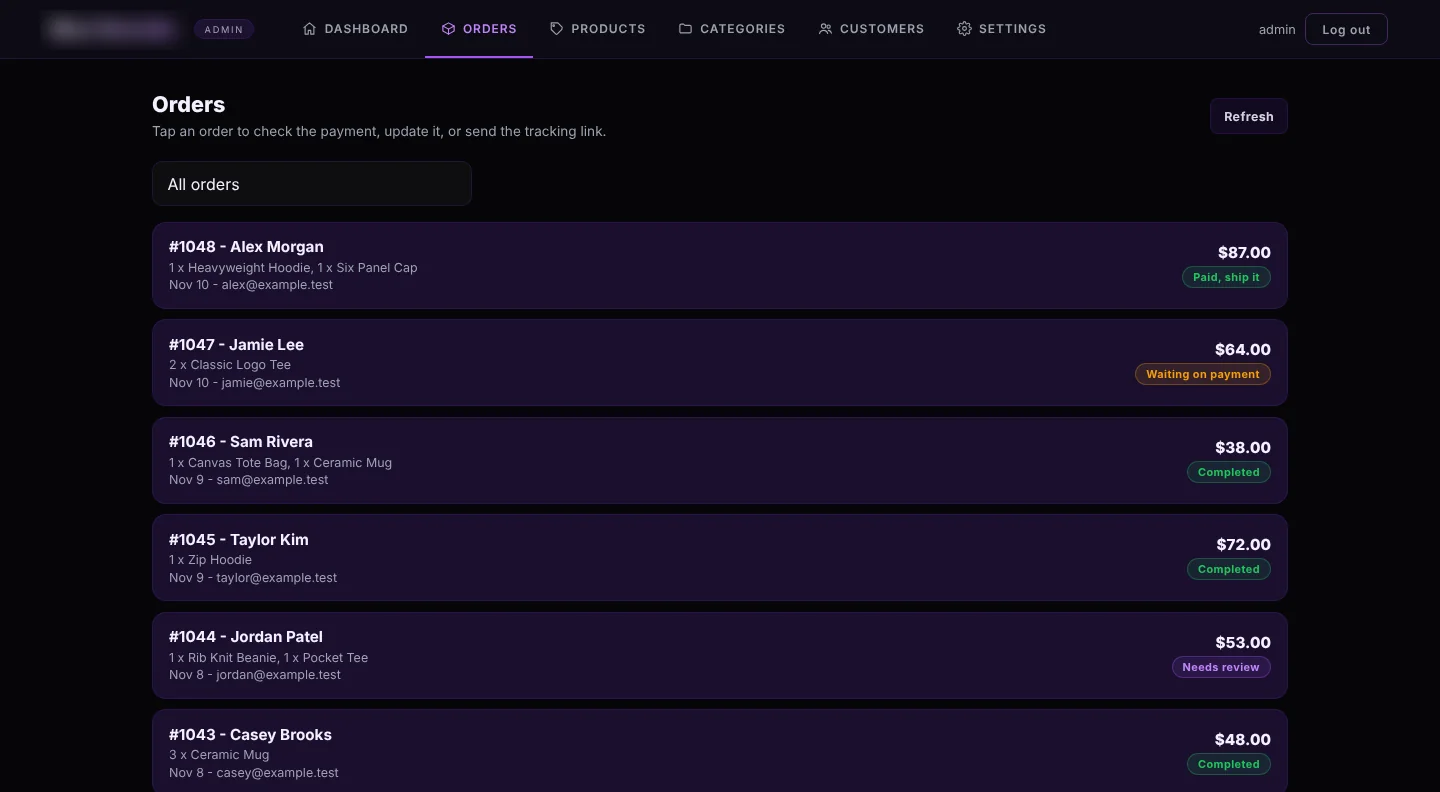
    The orders list in the admin: each order with customer, items, total and a payment status label.
    Orders, with payment status.

    Brand name and marks blurred. The owner's screens are shown with sample orders.

    Live

  • Catalog website for a group of liquor stores

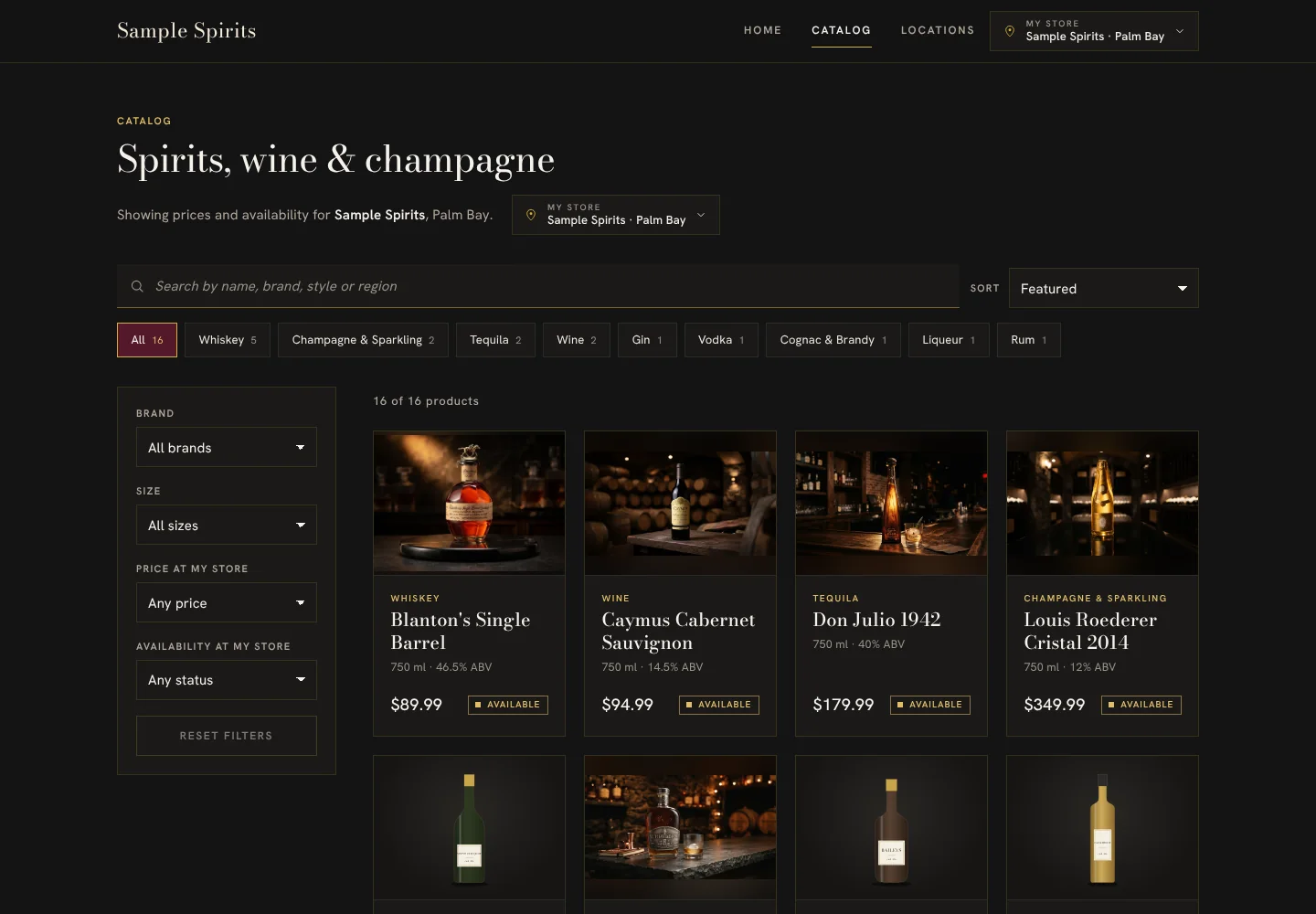
    Shoppers pick their store and see that store's prices and what is in stock, and can search and filter by brand, size and price. It is designed to connect to the stores' point-of-sale system, so the website follows the live inventory: when a price or stock level changes at the till, the catalog changes with it.

    A dark catalog page for spirits, wine and champagne with search, category tabs, filters and product cards showing price and availability.
    The catalog page. Store names replaced.

    Demo

  • Operations hub for a call center

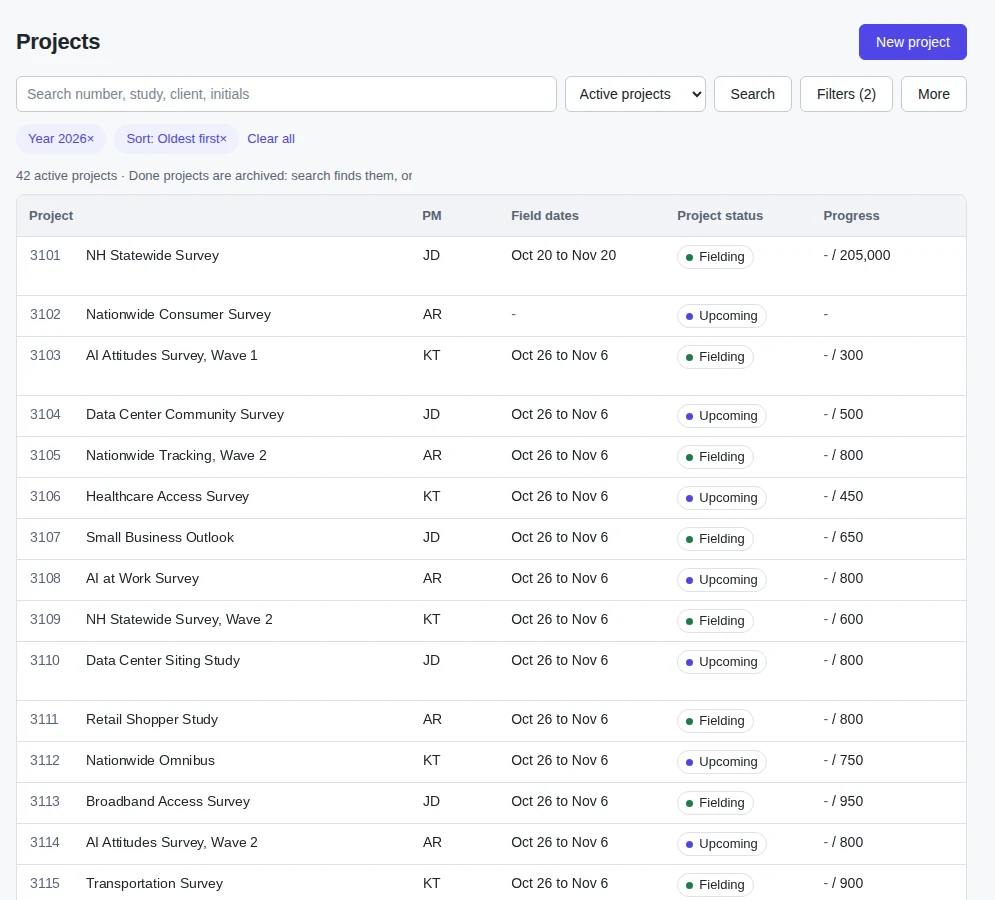
    One place for every study in the field: dates, status and progress, the schedule, hours worked and approved, and the handoff to billing. It replaced a set of spreadsheets. Alongside it, small tools prepare contact files, create tracked short links and manage sample lists.

    A projects list with study number, name, project manager initials, field dates, status and progress against target.
    The projects list, shown with made-up studies.
  • Donation kiosk for a nonprofit

    A touchscreen kiosk at the entrance. A visitor picks a fund, taps a fixed amount and pays by card. There are nine funds, and each one is paid out to its own bank account.

    In build

How a project goes

You do not need to know what to build. Finding that out is the first step, and it is our job.

  1. Listen

    You tell us what is not working, in your own words. We talk to the people who do the work, too.

  2. Design the system

    We write a plain-language plan: what gets built, how the pieces connect, what it costs. You agree to it before any code is written.

  3. Build

    AI tools write most of the code, to our design and under our direction. That is why it is faster and costs less.

  4. Check

    A person on our team reads the code, reviews logins, permissions and data handling, and tests on real phones and browsers.

  5. Launch, and stay

    We put it live and train your team. The same people keep it running afterwards on a flat monthly plan.

Yes, we build with AI

Writing code used to be the expensive part of software. It is not anymore. What still takes skill is understanding the problem, designing a system that fits it, and making sure the result is safe to run a business on.

So that is where our time goes. AI does the typing. People decide what gets built, and nothing reaches you or your customers until a person on our team has read it, tested it and approved it.

We also put AI to work inside the systems we build. Our customers snap a photo of an invoice and every line lands in their inventory, with suggested price changes. We connect ChatGPT, Claude and Grok through their official APIs, including voice features.

Pricing

Every quote starts from your budget. If the first design does not fit it, we find a version that does.

A website for your businessFreeBuilt with AI and reviewed by our team before it goes live.
A custom websiteLow cost, quoted firstFor when you need booking, ordering, customer accounts or anything specific to how you work.
Apps and connected systemsOne architecture feeYou pay for the design of the system, agreed before any build. The code is included.

After launch, support continues on a flat monthly plan.

Who we work with

A short list, on purpose. These are the kinds of business we understand best.

About Vextora Labs

Big ambitions, and we are just getting started. We are excited to solve your business problems.

Vextora Labs LLC is a fast-growing software company headquartered in Wyoming. Our customers are established businesses doing millions of dollars a year, with hundreds of customers of their own. We have shipped 7 projects for businesses in New York, New Jersey and Florida, we deliver nearly 3 new projects every month, and our team is growing quickly to keep up.

We started by solving the problem first. Our first customers tried what we built for free, and once they saw the results, they became paying customers. Every one of them still gets our support today.

We are driven by one idea: every growing business deserves software as good as the systems the biggest companies run on. That passion is behind every ordering app, warehouse tool and website we ship, and our goal is to become the software partner businesses across the country rely on.

The people you meet on the first call are the people who design your system, direct the build and review it before it goes live. No handoffs, from first idea to launch and beyond.

Already working with Vextora?

Your projects and conversations stay organized in one secure workspace.

Invited customers can review project updates, respond to approvals, find shared documents, see invoices and request support without searching through email threads.

Open customer workspace

Access is by invitation. New here? Tell us about your project and we'll help you get started.

LET'S BUILD SOMETHING USEFUL

Get a free consultation on your problem today.

Tell us what your team does today, where it gets stuck, and what a better process would look like. The consultation is free, and we reply within one business day.

Call or text (321) 208-4522

Or email [email protected]

No technical brief needed. Just describe the problem in your own words.

Your message goes directly to Vextora. We use it to respond to your inquiry.